


Field service teams need clear tracking because their work happens outside the office.
manager cannot walk across the room and check job progress. A dispatcher cannot guess where a technician is. An HR or payroll team cannot depend on handwritten timesheets forever.
The best way to track field service employees is to use a system that connects GPS tracking, job scheduling, dispatching, attendance, timesheets, job proof, route history, and reporting in one place.
That is where field service management software becomes useful. It gives managers real-time visibility without calling every employee again and again.
Why Field Employee Tracking Matters
Field employee tracking matters because managers need facts.
A manager needs to know who reached the job site, who started work, who finished the task, and who needs help. A dispatcher also needs to know who can take the next job.
Without tracking, teams often use calls, texts, paper forms, and WhatsApp updates. That may work for a very small team, but it breaks down when the business grows.
Field service management software helps fix this problem. It gives managers one place to see jobs, employees, schedules, locations, time logs, and reports.
How FieldServicely: Field Service Management Software Helps Field Teams
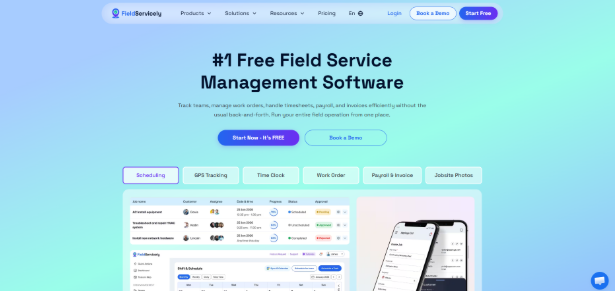
FieldServicely helps businesses track field employees and manage jobs from one platform.
It brings together GPS tracking, scheduling, work orders, timesheets, payroll, invoicing, reports, approvals, and team performance visibility.
The best part is the connection between field tracking and job management.
Managers can see where employees are, what job they handle, how much time they spend, and whether they submitted job proof. This gives the office team better control without slowing down the field team.
FieldServicely fits businesses that manage:
- Technicians
- Cleaners
- Maintenance teams
- Construction crews
- Delivery workers
- Field sales teams
- Inspection teams
- Mobile service employees
In my opinion, FieldServicely works well for teams that want simple field visibility without using many separate tools. It gives managers the core features they need in one place.
Use GPS Tracking to See Employee Location
GPS tracking gives managers real-time field visibility.
This helps when employees move across many customer locations in one day. It also helps dispatchers assign urgent jobs to the nearest available worker.
FieldServicely includes GPS employee tracking and field activity tracking. Its official site says teams can manage GPS tracking, timesheets, payroll, invoicing, scheduling, work orders, and reports without switching between systems.
This feature works well for:
- Cleaning teams
- Construction crews
- Delivery teams
- Maintenance workers
- Security staff
- Landscaping teams
- On-site service providers
In my view, GPS tracking should support work planning and accountability. It should not become a tool for unnecessary pressure.
Use Geofencing for Better Attendance
Geofencing improves attendance accuracy.
A geofence creates a virtual boundary around a job site. Employees can clock in or clock out only when they reach the approved location.
This helps reduce false check-ins. It also gives payroll teams cleaner time records.
FieldServicely combines GPS tracking, geofencing, timesheets, and payroll tools in one platform, according to Software Advice.
This makes sense for field teams because attendance should connect with real job locations. A clock-in time means more when it also shows where the employee started work.
Track Time by Job
Job-based time tracking gives better insight than daily attendance.
A worker may spend eight hours in the field, but those hours may include travel, waiting, setup, repair work, customer discussion, and reporting. Managers need to know where the time went.
FieldServicely supports timesheets and payroll based on employee hours. Its App Store listing also mentions job setup, job scheduling, and job approval with evidence submission.
This helps managers answer useful questions:
- Which jobs take the most time?
- Which employees finish jobs faster?
- Which job types need more training?
- Which customers need longer service windows?
- Which tasks create overtime?
In my opinion, job-based time tracking gives managers better control over labor cost. It also helps them price future jobs more accurately.
Build Clear Job Schedules
Clear job scheduling keeps field teams organized.
Each job should include the job location, customer name, assigned employee, start time, expected duration, task details, and priority level. This reduces confusion before the worker leaves for the site.
FieldServicely offers job management, GPS employee tracking, schedule and tracking tools, invoice and payroll features, and performance reporting features.
A good schedule should show:
- Who will do the job
- Where the job will happen
- When the job should start
- What task the employee must complete
- What proof the employee must submit
- What manager needs to approve the work
This helps both the office team and the field team.
Dispatch the Right Employee to the Right Job
Smart dispatching saves time.
Managers should not send a worker across town when another qualified employee is already nearby. They should also match the job with the right skill level.
FieldServicely helps companies with job scheduling, work order management, GPS tracking, geofencing, timesheets, payroll, and mobile access through web and mobile apps.
This matters in real service work.
For example, a senior technician should handle a complex repair if the job needs expert judgment. A nearby junior technician may handle a simple inspection faster.
Good dispatching improves job speed. It also improves customer experience.
Collect Proof of Work
Proof of work protects everyone.
A customer may say the task was not completed. A manager may need evidence before approval. A payroll team may need proof before closing timesheets.
FieldServicely’s field crew management page says crews can document completed work with photos, notes, and audio recordings.
Useful proof of work may include:
- Before-and-after photos
- Repair notes
- Customer signature
- Audio updates
- Material usage notes
- Job completion status
- Manager approval
This helps managers review work without visiting every site.
Use Route History to Understand Delays
Route history helps managers review travel patterns.
A late arrival does not always mean poor performance. Traffic, bad routing, long previous jobs, and wrong job sequencing can also cause delays.
FieldServicely supports real-time visibility into jobs, locations, timesheets, approvals, and team performance.
Route history helps businesses:
- Reduce travel time
- Plan better schedules
- Lower fuel waste
- Spot route issues
- Improve dispatch decisions
- Review field movement fairly
In my view, route history works best when managers use it to improve planning. It should not only serve as a blame tool.
Connect Timesheets With Payroll
Payroll needs accurate time data.
Manual timesheets can create errors, missing hours, inflated hours, and approval delays. Field service teams face this problem more often because workers operate away from the office.
FieldServicely includes timesheets, payroll, invoicing, and reports in the same field service management platform.
This gives payroll teams better records.
They can check time logs, job history, location data, and approvals before processing payment. That reduces disputes and saves admin time.
Use Reports to Improve Performance
Reports help managers turn field activity into better decisions.
Tracking alone does not solve every problem. Managers must review the data and act on it.
FieldServicely offers performance-related visibility through reports, dashboards, job activity, timesheets, approvals, and team performance data.
Managers should review reports for:
- Job completion rate
- Late arrivals
- Missed check-ins
- Overtime trends
- Travel time
- Job duration
- Employee workload
- Approval delays
- Payroll accuracy
This helps the business improve week by week.
Best Practices for Managing Field Jobs Efficiently
Field jobs need structure.
Managers should not only assign work. They should also define the location, task scope, expected time, employee role, and approval process.
A strong field job process should include:
- Create the job with full customer and location details.
- Assign the right employee or crew.
- Add clear task notes.
- Set the schedule.
- Track employee arrival with GPS or geofencing.
- Monitor job status.
- Collect proof of work.
- Approve the completed task.
- Review timesheets.
- Use reports to improve future planning.
This process keeps work simple.
It also gives managers a clear record from job creation to payment.
Common Mistakes to Avoid
The first mistake is tracking employees without explaining the reason.
Employees should know when tracking starts, what data managers can see, and how the business uses that data. Clear rules build trust.
The second mistake is using too many tools.
One tool for GPS, one tool for scheduling, one sheet for payroll, and one chat app for updates can create confusion. A single field service management platform often works better.
The third mistake is ignoring proof of work.
Location data shows where a worker went. It does not always prove the task was completed. Managers still need photos, notes, approvals, and job status updates.
The fourth mistake is not reviewing reports.
Reports show patterns. Managers should use them to improve routes, schedules, training, workload, and payroll accuracy.
Final Thoughts
The best way to track field service employees is to connect location, attendance, job schedules, proof of work, timesheets, payroll, and reporting.
GPS tracking shows where employees are. Geofencing improves attendance. Job management keeps work organized. Timesheets support payroll. Reports help managers improve performance.
FieldServicely brings these tools into one field service management software. That makes it a strong option for businesses that want to track field employees and manage jobs more efficiently.
In my opinion, the real value comes from using tracking as part of the full job process. When tracking connects with scheduling, dispatching, proof, payroll, and reports, the business gets better control without adding more manual work.









 Automatic Time Tracking Software
 Productivity Analyze and Tracking Software
 Employee Screen Monitoring Software
 App and Website Monitoring Software
 Time and Attendance Software
 Time Tracking Software for Freelancer
 Finance
 Banking
 Healthcare
 Lawyers
 Retail & ecommerce
 Knowledge base
 Blogs
Blogs Installation Guide
 FAQs
FAQs About
About Media Kit
 Contact us